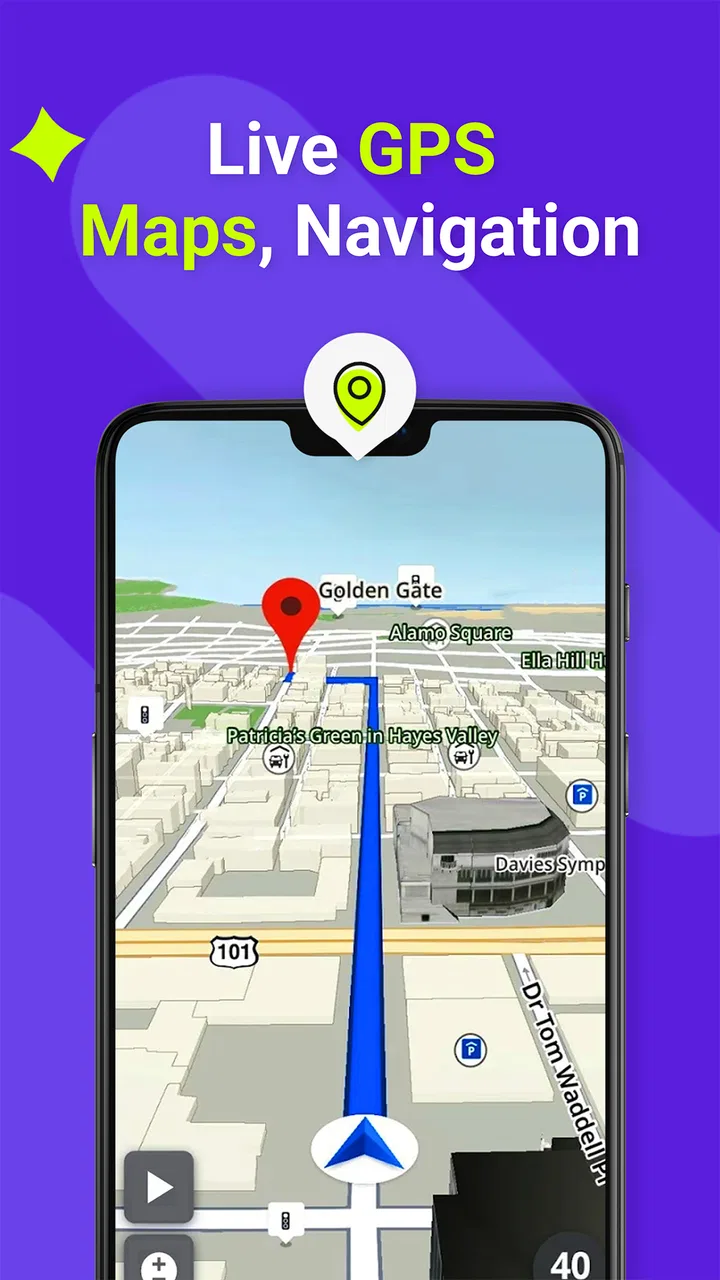
GPS, Maps, Driving Directions
- 4.0
- Rating
- 100.00M
- Installs
- Free
- Price

 Analysis by App-foxy
I have used GPS, Maps, Driving Directions as a practical companion for everyday journeys rather than treating it as just another map on my phone. Its main appeal is simple: it combines route planning, traffic awareness, voice guidance, and nearby-place discovery in one app. That makes it useful when I am leaving work, looking for a quicker way across town, or trying to find something worthwhile near an unfamiliar destination.
The app comes from AppVerge Technologies, LLC and sits in the Maps & Navigation category. It is free to install, available for everyone, and currently listed at version 14.00 for devices running operating system 10 or later. Its scale is hard to ignore: more than 100 million installs and an average score of 4.0 from roughly 107 thousand ratings show that it has become a familiar option for a large number of drivers.
That popularity does not automatically make it the right choice for every trip. In my experience, it works best when I want a straightforward driving tool with a little more local discovery than a basic navigation screen. It is less convincing when I need the deepest offline planning, highly specialized route controls, or the most polished ecosystem integration available from the biggest mapping platforms.
You May Also Like

 AccuWeather: Weather Radar
AccuWeather Review: A Quick, Clear Forecast for Everyday Decisions
For everyday plans, the best forecast is the one you can understand quickly. AccuWeather makes rain timing, radar, and local conditions easy to act on, with a few trade-offs.

 Hill Climb Racing
Why Hill Climb Racing Still Turns Crashes Into One More Run
A tiny car, a bumpy hill and one more upgrade: Hill Climb Racing keeps resurfacing because its simple chaos makes every near-miss feel personal.

 AliExpress - Shopping App
AliExpress Makes Global Shopping Feel Personal, but Shoppers Bear the Risk
AliExpress turns a global marketplace into a pocket-sized discovery engine. Its reach is useful, its shopping loop compelling, and its trade-offs easy to miss.

 Lords Mobile: Kingdom Wars
Lords Mobile Is a Kingdom-Building Routine, Not a Quick Match
A case-by-case verdict on the building, battles, device demands, and social commitments that make Lords Mobile rewarding for some players and exhausting for others.

 PDF Scanner app - TapScanner
TapScanner Makes Paperwork Easier to Capture, Check, and Share
TapScanner makes scanning with a phone feel less like a rescue operation and more like a dependable step in getting work done. Its capture tools are useful, though not flawless.

 Block Blast!
Block Blast! Shows How Much a Puzzle Game Can Leave Out
A quiet grid game shows why puzzle players increasingly value instant clarity, repeatable skill and low-pressure play—and where the genre still needs to catch up.
More From Our News Desk
View All News


How the current app feels on an ordinary drive
The first thing I look for in any navigation app is whether it gets out of my way. GPS, Maps, Driving Directions has a familiar purpose: enter a destination, choose a route, and follow voice instructions while keeping attention on the road. The store description focuses on finding a fast route, avoiding traffic, and discovering local places, and those three jobs explain the app better than a long feature list would.
For a normal commute, the useful part is not simply seeing a line on a map. It is being able to make a decision before I start driving. I can check the suggested path, consider whether traffic is likely to make it unpleasant, and decide if a slightly longer route is more sensible. That small planning step matters when I am heading to an appointment and would rather avoid an uncertain bottleneck than save a few minutes on paper.
Voice navigation is especially helpful when the phone is mounted low on the dashboard or when I am driving through an area I do not know. I prefer spoken prompts that let me keep my eyes ahead instead of repeatedly checking the display. The app is most comfortable in this role: it acts as a guide in the background, while the map remains available when I need visual confirmation at a complicated junction.
Its local discovery angle also changes how I use it. A conventional route planner is usually built around getting from point A to point B. This app is more appealing when the destination is flexible. If I am visiting a neighborhood for the first time, searching for a place nearby can be part of the same session as planning the drive. That is convenient for spontaneous stops, although I would still check the details of an unfamiliar business before making a special trip.
A realistic weekday example
Imagine leaving work on a rainy evening with a grocery stop needed before going home. I would first enter the home address, look at the suggested route, and then consider whether a nearby store makes more sense than my usual one. If traffic has built up along the familiar road, the app can help me compare the alternatives before I pull away. Once moving, voice prompts reduce the need to handle the phone, and the map is there for the final turns into a parking area or side street.
This kind of workflow is more useful than a one-off search because it combines several small decisions. The app is not merely telling me where to turn; it helps me adjust the trip around traffic and an intermediate stop. The trade-off is that every extra search can distract from the simplicity of the original journey, so I prefer to set up the route while parked.
What version 14.00 means for existing users
The current version is 14.00, and that gives the app a more mature feel than an experimental navigation product. I see that maturity in the way its main functions fit together: directions, traffic-aware planning, voice guidance, and place discovery are presented as parts of one driving experience rather than unrelated tools.
Still, a version number alone does not tell me that every part of the app has changed dramatically. I would not install it expecting a completely different navigation philosophy. Existing users should think of the current release as the present form of an established app, not as a reason to abandon habits that already work for them. The important question is whether its current route suggestions and local search style suit the way they drive.
For someone returning after an older installation, I would spend a few minutes checking the route before relying on it for an important appointment. Navigation apps can feel familiar while still presenting choices differently after updates. Reviewing the overview, confirming the destination, and listening for the first instruction is a sensible routine with this app, particularly in a busy city where a wrong turn can add much more time than expected.
The app was released on November 6, 2018, so it has had time to establish its identity. That history is reassuring for users who want something more established than a brand-new utility, but it also raises expectations. A long-running navigation app needs to remain clear and dependable as roads, traffic patterns, and user habits change. My impression is that the current release is aimed at keeping the core driving experience accessible rather than overwhelming it with specialist controls.
Where it stands beside familiar alternatives
Compared with the usual large mapping services, GPS, Maps, Driving Directions feels more focused on the act of driving. Its combination of voice guidance and traffic-conscious routing is easy to understand, and the local-gems idea gives it a more exploratory personality than a plain route calculator. For a driver who wants one app for the journey and a nearby stop, that combination can be attractive.
The larger alternatives often feel stronger when I need a complete map ecosystem: extensive place information, deeply integrated calendars or contacts, public transport coverage, walking routes, or highly detailed offline preparation. They may also be more familiar to passengers who want to take over the search or share a destination. I would choose those services when the trip involves several transport modes or when I need rich information about a place before visiting.
This app makes more sense when the priority is a clean driving task. I would recommend trying it to someone who finds heavyweight map apps cluttered or who wants local discovery to sit close to route planning. I would not recommend switching solely because the app promises a fast route; traffic conditions are variable, and no navigation tool can turn every drive into a predictable one.
Practical strengths, friction, and better ways to use it
I find the most useful way to assess this app is to ask how it works when a phone is shared, not just whether it can guide one driver. A household can use it for separate errands or as a passenger-assisted navigator, but each person should agree on who enters destinations and changes routes. That everyday arrangement leads naturally to the practical question of keeping setup simple without assuming the app provides family controls.
Use the route preview as a decision tool
One of the most useful habits is to treat the initial route screen as a planning surface, not something to dismiss immediately. Before starting, I look at the general shape of the journey and ask whether the suggested road matches my real preference. The fastest option is not always the least stressful: a route with awkward turns, heavy merging, or an unfamiliar final approach may be worse than a slightly slower alternative.
This is a particularly good use of the app’s traffic focus. Rather than blindly following the first recommendation, I use the traffic information to understand why a route is being suggested. If the app redirects me, I want to know whether that is due to congestion or simply a different calculation. That extra awareness makes me more confident when the route changes during a drive.
Prepare complicated destinations before moving
A non-obvious weakness of phone navigation is that the last part of a trip can be harder than the main road. Large campuses, shopping areas, apartment complexes, and one-way downtown streets can turn a simple address into a confusing arrival. With this app, I would search for the destination and inspect the final approach while parked, then start voice guidance only after I understand the broad entrance direction.
This workflow also helps with local discovery. If I am choosing a nearby restaurant or shop, I can compare its location with the route rather than selecting a place that looks close but requires an inconvenient detour. The app’s discovery feature is most valuable when I use it geographically, not just as a list of attractive names.
Keep voice guidance in charge of attention
I find voice navigation most useful when I resist the temptation to stare at the map. The screen can confirm the road layout, but the spoken instruction should handle the routine work. I would set the route before departure, mount the phone securely, and avoid changing the destination while moving. If a new stop becomes necessary, pulling over is the safer and less frustrating choice.
There is also a practical trade-off here. Voice prompts are convenient, but they are only as helpful as the driver’s understanding of the surrounding road. I still glance at signs and follow local traffic rules instead of treating the app as an authority. A navigation instruction can be technically correct while the real-world entrance is busy, restricted, or temporarily difficult to use.
Understand the free model before committing
The app is free, which makes trying it low-risk. It also includes in-app purchases ranging from $2.49 to $19.99 per item. I would not assume that every useful part of the experience is covered by the free installation, and I would review any purchase screen carefully before confirming it. The important point for a potential user is that the basic download does not necessarily mean the entire product experience has no paid layer.
For occasional drivers, the free starting point may be enough to decide whether the interface and route style feel comfortable. Frequent users should consider whether the paid options offer something they genuinely need rather than paying simply because the app is already installed. I prefer to test the everyday workflow first: destination search, route preview, voice guidance, and nearby-place discovery.
Who will appreciate it most
I think the app is a strong candidate for drivers who regularly travel around town, want spoken directions, and enjoy finding useful places near a route. It suits people who prefer a dedicated driving experience without having to assemble separate tools for traffic, directions, and spontaneous stops. It is also approachable for households where different people need a simple navigation option on compatible devices.
It is less suitable for someone whose trips depend heavily on offline maps, detailed multi-modal planning, hiking trails, or complex route customization. I would also hesitate to make it my only navigation tool for remote travel without first testing how well it handles the areas and destinations I visit. For those needs, a specialist offline map or a broader mapping platform may be a better fit.
Questions I would settle before switching
A common concern is whether the app is appropriate for a child or family device. Its content rating is Everyone, so it is positioned for a broad audience. That does not remove the need for sensible supervision while driving: the person operating the vehicle should configure the route, and passengers should handle searches or changes whenever possible.
Another question is device compatibility. The current version requires operating system 10 or later. I would check the phone’s system version before planning a trip around the app, especially if the device is older or has not been updated recently. Compatibility is easy to overlook when an app appears free in the store.
People also ask whether a traffic-aware route is always the fastest in practice. I would treat it as a useful recommendation, not a guarantee. Traffic can change after the route is calculated, and a short delay on a supposedly clear road may be less frustrating than a complicated detour. The best result comes from combining the app’s suggestion with local knowledge and a quick look at the route shape.
Finally, I would ask whether local discovery is truly useful or just decorative. In my experience, it becomes useful when I have a flexible stop, such as finding food, fuel, or a convenient service near the road I am already taking. It is less valuable when I already know the exact business I want or when the destination’s opening details matter enough to require separate confirmation.
What I would watch in future updates
For future versions, I would pay attention to how the app handles the balance between speed and clarity. Faster route suggestions are welcome, but not if they make the interface harder to read or the voice prompts less predictable. I would also watch whether local discovery remains focused on genuinely useful stops instead of becoming a distraction from driving.
Existing users should watch for changes in the way routes are presented, particularly after installing a new release. A small adjustment to the route overview or voice timing can affect muscle memory. My advice is to test the app on a familiar short drive after an update before relying on it for an unfamiliar journey.
I would also keep an eye on the paid layer. Since purchases are available inside the free app, future changes may influence which conveniences are included in the basic experience and which are optional. That does not make the model a problem by itself, but transparency matters to anyone who wants predictable navigation without unexpected costs.
After using it as a daily driving aid, my view is that GPS, Maps, Driving Directions is worth trying for people who want practical voice guidance, traffic-aware planning, and a simple way to discover places near their route. Its strengths are clearest in ordinary city driving and flexible errands, where several small navigation decisions happen in one trip.
I would keep a larger mapping service available for complex travel, rich place research, or journeys that require offline preparation. Even so, AppVerge Technologies, LLC has produced an accessible option with a broad audience and a clear purpose. The free entry point makes experimentation easy, while the current version offers enough maturity for regular use. My recommendation is conditional but positive: test it on familiar roads first, learn how its route choices feel, and then decide whether its driving-focused style fits your routine.
FAQs for GPS, Maps, Driving Directions
01Is the GPS, Maps, Driving Directions app free to use?
Yes, the basic features of the GPS, Maps, Driving Directions app are free to use. However, there may be in-app purchases or subscriptions for additional features or to remove ads. Always check the app store listing for specific pricing details before downloading.
02Does the app require an internet connection to function?
While some features like live traffic updates and real-time navigation require an internet connection, the app also offers offline maps. You can download maps for specific regions to use when you are without a network connection, which is especially useful for traveling in remote areas.
03How accurate are the navigation directions provided by the app?
The app uses advanced GPS technology to provide accurate navigation directions. However, accuracy can be affected by factors such as network connectivity, satellite visibility, and device capabilities. It's always good to cross-reference with local signage and information, especially in unfamiliar areas.
04Can I customize routes in the GPS, Maps, Driving Directions app?
Yes, the app allows users to customize their routes by adding multiple stops, avoiding toll roads, or selecting different modes of transportation. This flexibility helps tailor the navigation experience to suit your preferences and travel needs, ensuring a smoother journey.
05What features does the app offer for safety during driving?
The GPS, Maps, Driving Directions app includes several safety features such as voice-guided navigation, real-time traffic alerts, and speed limit notifications. These features help keep your focus on the road while staying informed about potential hazards or traffic conditions ahead.
Pros
- Highly accurate real-time GPS tracking.
- User-friendly interface with clear maps.
- Offline maps available for remote areas.
- Voice-guided navigation for safer driving.
- Frequent updates with new features.
Cons
- Consumes significant battery power.
- Occasional map loading delays.
- Ads can be intrusive at times.
- Requires internet for live traffic updates.
- Limited customization options for routes.

GPS, Maps, Driving Directions
Gallery